This is Part 2 of our FOG Chronicles series. If you want to read our spoiler-free thematic review and historical impact analysis of the game first, check out Part 1: Kuon no Kizuna (1998) - The Masterpiece of Reincarnation.
How to Play Today: Version & Platform Guide
I know what you are thinking: “This sounds incredible, but I don’t read Japanese.” Don’t let the language barrier stop you from experiencing this cultural milestone. With modern translation tools, you can easily experience Kuon no Kizuna fully in English with near-perfect accuracy.
First, let’s grab the right version of the game. Here is a breakdown of the available platforms and the emulation caveats you need to know:
PlayStation 2 Version (Kuon no Kizuna: Sairinshou, 2002) - Recommended
- The Price: Incredibly cheap. Used Japanese physical copies are widely available on Surugaya or eBay for around $5 to $15.
- The Stability: Excellent. It runs flawlessly on the PCSX2 emulator. It features a massive post-game append story, balance adjustments, and new endings, making it the definitive edition.
PSP Version (2009) - Not Recommended for Emulation
- The Price: Notably more expensive and rarer than the PS2 version, often costing $60 to $100 due to limited physical prints.
- The Emulator Bug: Beware! There is a well-known technical glitch on the PPSSPP emulator where the gorgeous opening movie fails to play (resulting in a black screen or potential freeze) due to video codec issues. Missing the intro severely hurts the eerie visual novel atmosphere.
Avoid: Kuon no Kizuna -THE ORIGIN- (PC, 2011)
Do not mistake this for the original game. THE ORIGIN is an 18+ adult game remake by a different studio (Xuse). It completely rewrites the plot, removes the entire Bakumatsu era, and alters the tone into a generic eroge. Stick to the PS2 version for the authentic FOG experience.
Windows & Mobile: The Fully-Voiced Alternatives (For Hardcore Fans)
While the original PlayStation version is iconic, did you know there are fully voiced versions of Kuon no Kizuna available? If you want to experience the 1,000-year tragic narrative with incredible voice acting, you have distinct premium and mobile choices.
Both options are 100% in Japanese only, but they are highly sought after by enthusiasts using translation tools.
| Platform / Edition | Accessibility (Western Fans) | Technical Caveats & Compatibility |
|---|---|---|
| PC (Windows) Kuon no Kizuna: Sairinsho - Fully Voiced Edition (2011) | Low (Rare) Long out of print; commands premium prices as a rare collector’s item on the second-hand market. | Good (with patch) Runs on Windows 11 via compatibility mode. Requires the official XUSE patch to bypass online serial code activation. |
| iOS / iPadOS Kuon no Kizuna: Sairinsho (Mobile Port) | High (Hidden Gem) Visible and purchasable directly from the US App Store without needing a Japanese Apple ID! | Excellent Confirmed working perfectly on modern iPadOS. Highly recommended for easy legal access. |
| Android Kuon no Kizuna: Sairinsho (Mobile Port) | Low Available on Google Play but highly region-restricted and hard to purchase from abroad. | Poor (Outdated) Has not been updated recently. Likely to fail installation or throw compatibility errors on modern Android OS. |
Step-by-Step: Setting Up Your English Translation Environment
Since Kuon no Kizuna relies on a complex web of memory addresses across different platforms, classical “text-hooking” can be notoriously unstable-especially on console emulators.
Instead, the most reliable, universal, and foolproof method for Western players is using High-Speed Screen OCR via LunaTranslator. This method works flawlessly across the PCSX2 emulator, the rare PC version, and even iOS screen mirroring.
The Ultimate Universal Setup (LunaTranslator OCR)
Here is how to configure it step-by-step based on the latest version:
- Prepare Your Game Screen on PC:
- For PS2: Boot the game in your PCSX2 emulator window.
- For iOS: Mirror your iPad/iPhone screen to your PC using a free app like LetsView or AirServer.
- For PC Version: Launch the game in windowed mode.
- Configure Core OCR Settings:
- Download and launch LunaTranslator.
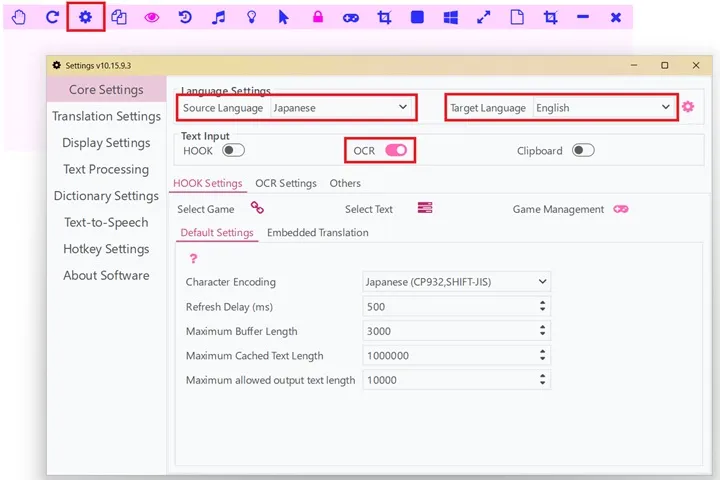
- Click the Gear (Settings) icon on the toolbar to open the settings menu.
- Under “Core Settings,” enable the “OCR” module.
- Set the “Source Language” to Japanese and the “Target Language” to English.
- Capture the Text Area:
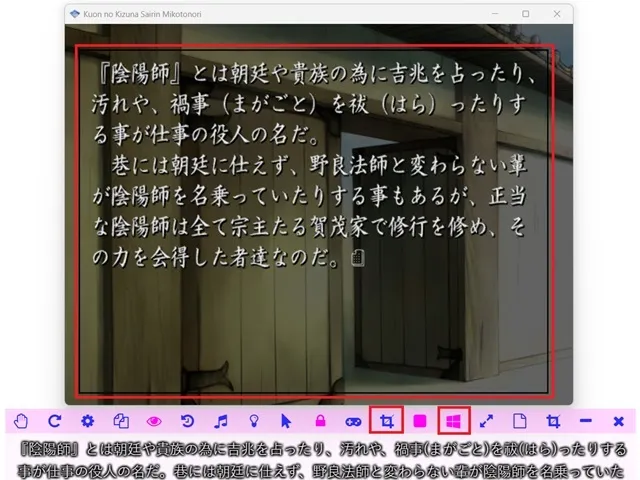
- Click the “Select OCR Region” icon on the toolbar, then drag the bounding box precisely over the game’s dialogue text box area at the bottom of your screen.
- Pro-Tip: Click the “Bind To Window” icon on the toolbar. This locks the OCR bounding box to your game window, meaning the translation area will dynamically move and scale even if you drag the game window around your desktop!
- Choose Your Engine & Trigger Mode:
- By default, the included Google translation engine works surprisingly well. However, you can connect your preferred engine via the settings. LLMs (like GPT/Claude) or DeepL are highly recommended, as they handle Kuon no Kizuna’s archaic, poetic Japanese and Shinto terminology beautifully.
- By default, LunaTranslator periodically scans the OCR region. You can also configure it to automatically trigger only when it detects changes on the screen, or map a comfortable hotkey (like the spacebar) to translate manually.
Translation Benchmark: How accurate is it?
To give you an idea of how powerful modern translation is when paired with this setup, look at this actual benchmark from Kuon no Kizuna’s introduction. Even with complex prose and esoteric historical concepts, the result is incredibly natural:
Original Japanese: 『陰陽師』とは朝廷や貴族の為に吉兆を占ったり、汚れや、禍事(まがごと)を祓(はら)ったりする事が仕事の役人の名だ。巷には朝廷に仕えず、野良法師と変わらない輩が陰陽師を名乗っていたりする事もあるが、正当な陰陽師は全て宗主たる賀茂家で修行を修め、その力を会得した者達なのだ。
English Translation via LunaTranslator: An “Onmyoji” is an official whose job is to divine good omens for the imperial court and nobility, and to ward off impurities and misfortunes. While there are some who call themselves Onmyoji and do not serve the court, and are no different from vagrant monks, all legitimate Onmyoji are those who have trained under the Kamo family, the head family, and acquired their powers.
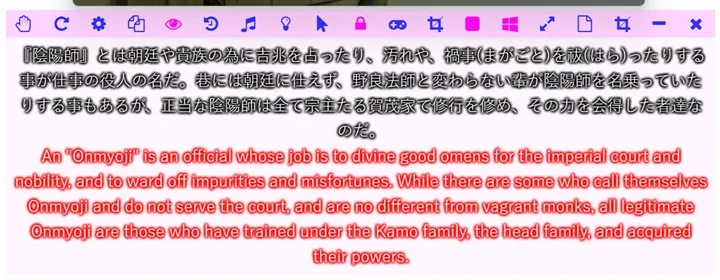
As you can see, difficult cultural terms like “Magagoto” (禍事) are beautifully captured as “misfortunes,” and “Nora-Houshi” (野良法師) expertly becomes “vagrant monks.” The poetic, ominous tone of FOG’s writing remains completely intact, proving that the language barrier is officially dead.
Final Recommendation for Western Players
If you are an iOS/iPadOS user, the mobile version is an absolute hidden gem that you can grab directly from the store. You can easily mirror your iPad screen to your PC and use tools like LunaTranslator to read it in English. If you are a physical game collector, hunting down the rare PC version or grabbing a cheap PS2 physical copy is a badge of honor!
Obtain your copy, set up your translation tools, and let’s preserve this masterpiece together!
Next Up in FOG Chronicles: How a developer went from ancient curses to the ultimate Lo-Fi motorcycle travel simulator. Stay tuned for our retrospective on Fuuraiki (2001).